
InstaTxtr2.7.2 - App Store
You'll be able to see results in few seconds.
Publisher Description
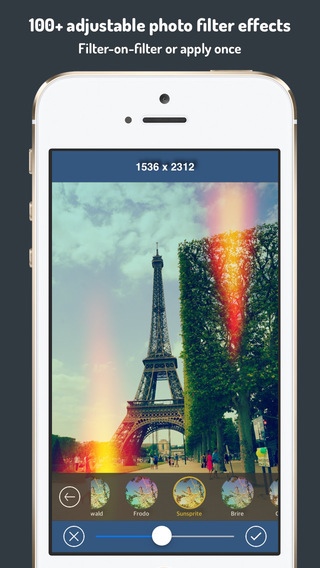
InstaTxtr is an awesome & easy-to-use photo editing app comes with comprehensive features including awesome photo filters, gorgeous light-leak textures, cropping & transformation tools, beautiful photo frames, hashtags, texting & templates etc. In just seconds, you can easily snap photos & then edit the image to the result you want and post on Instagram, Facebook, Twitter etc. Features at a glance are as follows:
* iOS 8 PHOTO EDITING EXTENSION
You can use InstaTxtr filter effects, light-leak textures & texting for your photos right in the iOS 8 Photos app.
* 147 ADJUSTABLE FILTERS
34 Original filters, 32 Tone filters, 21 Color filters, 13 Glow filters, 31 Tone 2 filters & 16 Monochrome filters.
* 69 GORGEOUS LIGHT-LEAK & dusty OVERLAYS
InstaTxtr has 69 overlays/textures which let you apply light leaks, fancy lights to your photos. You can easily tweak the colors of overlays to make them blend best with your photos!
* 24 FRAMES
InstaTxtr comes with 24 beautiful photo frames for full or square-sized images.
* SQUARE-READY FRAME FOR POSTING FULL-SIZED PHOTOS TO IG
InstaTxtr also comes with square-ready frame that allows you to post full-sized photo to Instagram, you can easily position/scale/rotate your image within the square by using pinch, touch & drag gestures. Square-ready frame can be changed to any color you want.
* FLEXIBLE CROPPING, ROTATE, FLIP
You can easily crop your photos with 13 preset cropping tools. And you can also rotate, flip horizontally or vertically for your photos.
* VARIOUS ADJUSTMENTS FOR PHOTOS
You can easily adjust your photos for brightness, clarity, contrast, exposure, gamma, saturation, sharpness, vibrance, vignetting & more to come...
* TEXTING & TEMPLATE
You can add multiple texts to photos. Each text can have its own color or font type. And you can use pinch & touch gestures to scale, rotate & position texts respectively. InstaTxtr also comes included with some templates for you
to add your lovely quotes to post on IG.
* CAMERA
You can switch between taking full size or square photos. However, if you've chosen to take full-sized photos, you can also easily crop it later to your required size using the cropping tools. Camera also supports pinch to zoom etc.
* APP SETTINGS
Various settings for you to tweak how you want InstaTxtr to work including save photo to photo album, append app signature, use max resolution, auto finalize filters & overlays (which allow for filter on filter) & image editing with history.
*** Try InstaTxtr - photo editor, filter effects, light-leak textures & texting for Instagram, Facebook, Twitter Today!!! ***
** Special thanks to our friends, Instagrammers @ritah_dparis (Eiffel Tower) for providing their beautiful pics for the screenshots of this app.
Requires iOS 5.1.1 or later. Compatible with iPhone, iPad, and iPod touch.
About InstaTxtr
The company that develops InstaTxtr is Chee Ket Yung. The latest version released by its developer is 2.7.2.
To install InstaTxtr on your iOS device, just click the green Continue To App button above to start the installation process. The app is listed on our website since 2012-12-16 and was downloaded 0 times. We have already checked if the download link is safe, however for your own protection we recommend that you scan the downloaded app with your antivirus. Your antivirus may detect the InstaTxtr as malware if the download link is broken.
How to install InstaTxtr on your iOS device:
- Click on the Continue To App button on our website. This will redirect you to the App Store.
- Once the InstaTxtr is shown in the iTunes listing of your iOS device, you can start its download and installation. Tap on the GET button to the right of the app to start downloading it.
- If you are not logged-in the iOS appstore app, you'll be prompted for your your Apple ID and/or password.
- After InstaTxtr is downloaded, you'll see an INSTALL button to the right. Tap on it to start the actual installation of the iOS app.
- Once installation is finished you can tap on the OPEN button to start it. Its icon will also be added to your device home screen.
Program Details
System requirements
Download information
Pricing
Version History
version 2.7.2
posted on 2012-12-16
Disclaimer
Official App Store Link
We do not host InstaTxtr on our servers. We did not scan it for viruses, adware, spyware or other type of malware. This app is hosted by Apple and passed their terms and conditions to be listed there. We recommend caution when installing it.
The App Store link for InstaTxtr is provided to you by apps112.com without any warranties, representations or guarantees of any kind, so access it at your own risk.
If you have questions regarding this particular app contact the publisher directly. For questions about the functionalities of apps112.com contact us.
